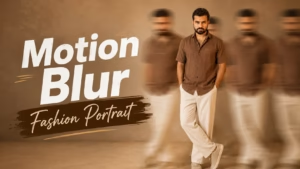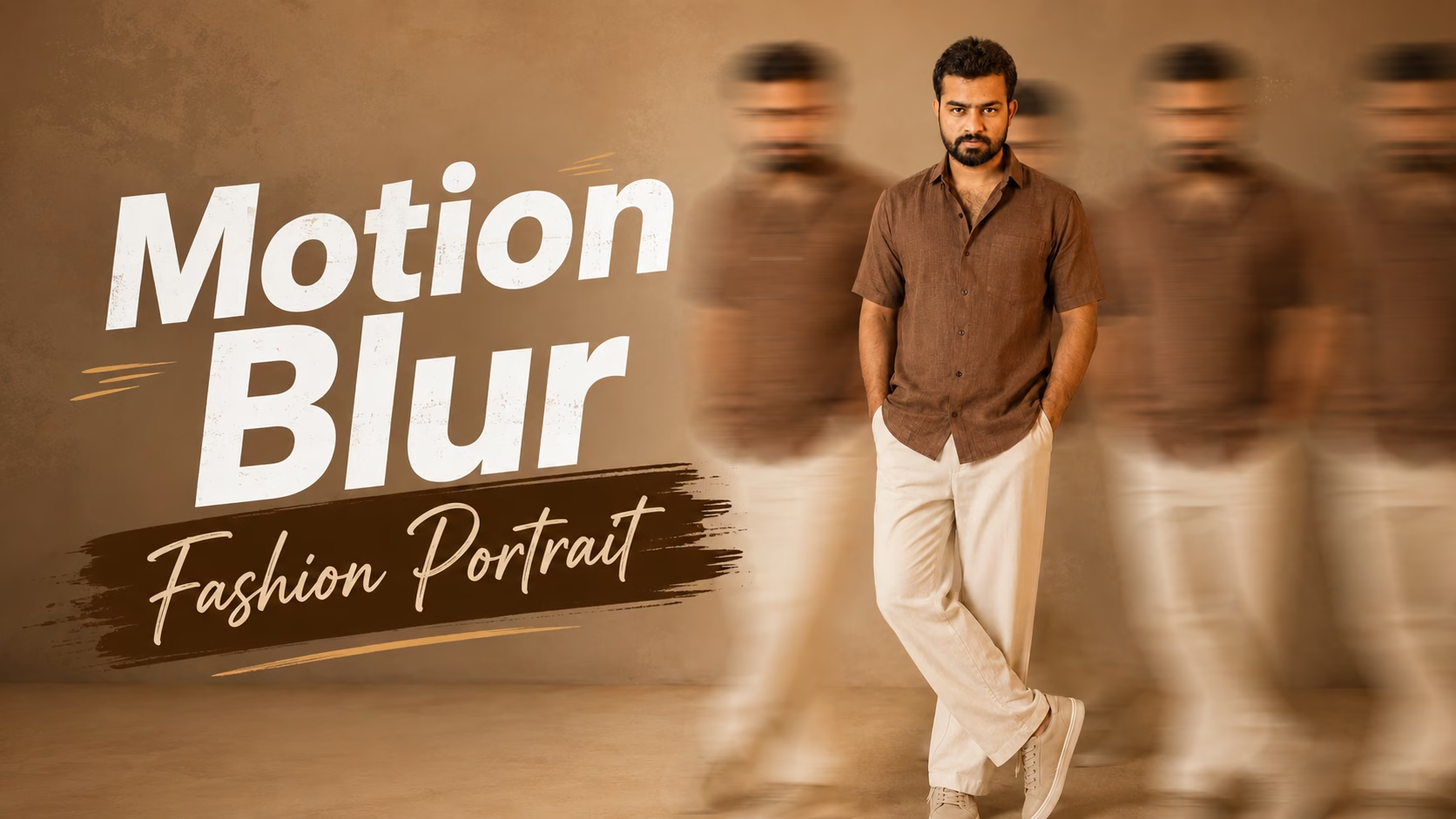
AI image generation has made it easier to transform an ordinary portrait into a professional fashion editorial photo. With the right AI Motion Blur Fashion Portrait prompt, you can create a realistic full-body image with a sharp central subject and dynamic motion-blurred duplicates around them.
This style combines cinematic lighting, minimalist backgrounds, realistic clothing textures, and long-exposure motion effects to create a premium fashion photography look.
AI Motion Blur Fashion Portrait
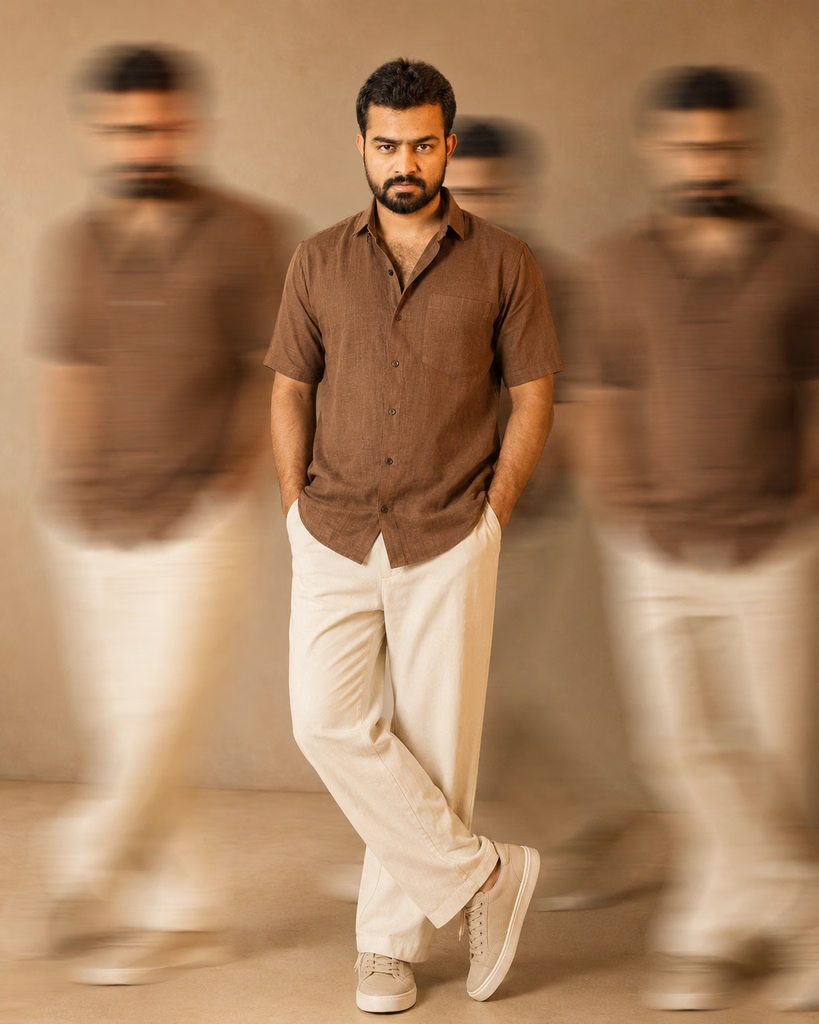
Prompt 👇
Create an ultra-realistic cinematic full-body fashion portrait of the person using the uploaded reference image. Preserve the person’s exact facial identity, facial structure, skin tone, hairstyle, and natural features.

The person is wearing a stylish earthy-brown short-sleeve button-up shirt, cream/off-white wide-leg trousers, and beige low-top sneakers. Hands casually placed inside the trouser pockets, standing confidently with one leg naturally crossed over the other.

Keep the main person perfectly sharp and in focus. Add multiple motion-blurred duplicates of the same person moving quickly across both sides of the frame, creating a dynamic long-exposure effect, while the central subject remains completely sharp.

Warm beige minimalist studio background and floor, soft diffused warm lighting, subtle shadows, cinematic neutral tones, realistic skin and fabric texture, natural proportions, shallow depth of field, premium fashion editorial photography, 50mm lens, ultra-photorealistic, highly detailed, vertical 4:5 composition.
What Is an AI Motion Blur Fashion Portrait?
An AI Motion Blur Fashion Portrait is a creative AI-generated image where the main person remains perfectly sharp while multiple blurred versions of the same person appear moving around the frame.
This creates a realistic long-exposure photography effect that is commonly seen in fashion editorials, magazine covers, and cinematic portraits.
The central subject stays in focus, while the surrounding motion blur adds movement and visual depth.
How to Use the AI Motion Blur Fashion Portrait Prompt
To create this AI Motion Blur Fashion Portrait, first upload a clear reference photo where the person’s face is clearly visible. The AI should use the uploaded image to maintain the person’s facial identity and natural appearance.
Then paste the complete prompt into your preferred AI image generator. Make sure the reference image option is enabled if the platform provides one.
For the best result, use a high-resolution portrait with good lighting and minimal obstruction around the face.
Why This AI Fashion Prompt Creates a Premium Look
This prompt combines several important elements of professional fashion photography:
- Full-body fashion composition
- Realistic facial identity preservation
- Stylish modern clothing
- Long-exposure motion blur
- Minimalist studio environment
- Warm cinematic lighting
- Natural shadows
- Realistic skin and fabric textures
- Shallow depth of field
- Premium editorial photography style
Together, these elements help create a polished AI fashion portrait rather than a simple AI-generated photo.
Tips for a More Realistic AI Fashion Portrait
For a more realistic result, keep the prompt specific about facial identity, body proportions, lighting and clothing.
Avoid adding too many unrelated visual elements. The main subject should remain sharp, while the motion-blurred duplicates should stay secondary.
You can also experiment with different poses, outfits and studio colors while keeping the same long-exposure concept.
Create Your Own AI Fashion Photography Style
Once you understand the basic AI Motion Blur Fashion Portrait prompt, you can customize it for different fashion styles.
Try changing the outfit to a formal suit, denim combination, streetwear outfit or traditional clothing. You can also experiment with different studio backgrounds, lighting styles and motion directions.
This makes the prompt useful for creating unique profile pictures, social media posts, fashion concepts and creative photography projects.
Conclusion
The AI Motion Blur Fashion Portrait style is a creative way to turn a normal reference photo into a cinematic fashion editorial image. By keeping the main subject sharp and adding motion-blurred duplicates around them, you can create a realistic long-exposure photography effect with a premium visual style.
With a clear reference image and the right AI prompt, you can experiment with different outfits, poses, backgrounds and cinematic effects to create your own unique fashion portrait.
You can use ChatGPT to generate the image using the prompt provided in this article.
Frequently Asked Questions (FAQ)
What makes an AI Motion Blur Fashion Portrait different from a regular AI photo?
An AI Motion Blur Fashion Portrait combines fashion photography with artistic motion-blur effects, creating a dynamic image where the subject remains visually striking while the surrounding movement adds a stylish and energetic feel.
Can motion blur be added without losing the main subject’s details?
Yes, the prompt can be written to keep the person’s face, clothing and important features sharp while applying controlled motion blur to selected areas, which helps maintain the identity of the subject and gives the image a professional photography look.
What kind of photos work best for this fashion effect?
A full or half-body photo with a clear face, good lighting and a suitable pose generally works well because the AI can better understand the subject’s body position and apply the motion effect naturally.
Is this style suitable for social media profile and fashion posts?
Yes, this type of portrait can work particularly well for Instagram posts, fashion edits, creative profile pictures and other social media content where a modern editorial photography style is preferred.
Can I control the amount of motion blur in the AI-generated portrait?
The intensity and direction of the motion blur can usually be influenced by describing the desired movement, camera effect, background motion and sharpness of the subject in the prompt, allowing you to create either a subtle or more dramatic fashion effect.